Pages

HOW TO USE SAMSUNG PHONE AS A MODEM

With Samsung PC Studio, kies or any related software we can make a connection wizard so the phone can be used as a modem easily.

SAMSUNG GT-C3322 LAKOTA DUOS

Lets take a look to the new model GT-C3322, specification and review. Low price with nice features.

Nov 10, 2011

Configure Screen Lock Galaxy Tab 10.1

There are 5 configurations of screen lock on Galaxy Tab 10.1 (GT-P7500).

1. Off, this configuration make the device without screen lock.
2. Unsecure, the device will have screen lock without require PIN, password or pattern.
With that's mean we just need to move the padlock image on the screen when the phone is idle then we can go to device's menu.
3. Pattern, we need to draw the pattern to open the screen lock with this configuration.
4. PIN, this configuration is the way to open the screen lock by entering PIN number that we have already made.
5. Password, if we configure the lock with this mode we must enter the password when opening the device's screen.

screen lock

Nov 4, 2011

Enable Adobe Flash Player Plugin on Galaxy Tab 10.1

Adobe Flash Player is a cross-platform, browser-based application runtime that provides uncompromised viewing of expressive applications, content, and videos across browsers and operating systems.
Flash Player 10.3 delivers beautiful HD video, faster graphics rendering, and high performance on mobile devices and personal computers and is designed to take advantage of native device capabilities — enabling richer, more immersive user experiences. (www.adobe.com)

We can get Adobe Flash Player for Galaxy Tab 10.1 from android market. Type "adobe flash player" on the search bar to search and get this plugin.
When we have already installed it to the device, some problems may occur just like when we want to play flash game or view flash video on the web there is still appear a caution to install flash player plugin at first.
It's happened because the plugin setting on the web browser is disabled. We should enable it by opening the internet browser then go to setting menu and make the plugin setting to be "always on".


The image below shows the caution to install Flash Player.
flash player1


Open Web Browser then go to setting menu.
flash player2


Enable Plugin to be "Always On"
flash player3


flash player4

Delete Recent Files on ThinkFree Office Galaxy Tab

If we use ThinkFree application to open office document on Galaxy Tab, in the recent doc folder
it will appear automaticaly the list of file that we have already opened.
Just like when we open office doc on windows, we can see the recent doc at start menu.
And there is no option for deletion in the ThinkFree application itself.

When we intend to remove it from the recent doc folder :
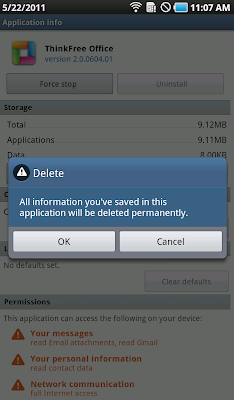
- Go to setting menu --> Application --> Manage Application --> All
- Find ThinkFree Office App and tap on it.
- Chose to clear data.
- All data user such registered user name, password and recent doc on the application will be cleared. But don't be worry, it will not delete the file.
- Open thinkfree app then we will find "no data" at the recent doc.


Default Foreign Language Keyboard on Android

With the rapid development of mobile phone technology, mobile phone users can enjoy various attractive facilities and one of them is to send short messages (SMS).

With android mobile phone, users can send sms using text with letters from several countries such as the writing language of chinesse, korea, thailand, vietnam, etc. For example in this posting i use Galaxy Ace.

Galaxy Ace is one of android phone provided by Samsung. To use this other language letters we need to configure the setting.

- Go to menu Setting -> Languange and keyboard -> Samsung keypad setting.
- We can see the keypad setting, tap on Input languages -> select which languange we want to use.
- Now we are ready to use it. Go to message menu then create new message, to change the languange just slide finger on spacebar.


Android Phone Auto Rotation Problem

Sometimes we are too preoccupied with our mobile phones with all of the features inside and suddenly we just realized that the phone can not rotate properly.
With that's mean when we rotate the phone horizontally, the display rotates in the opposite direction, disordered or it doesn't rotate at all. So, what we gonna do?

Should see the display setting menu, make sure that the auto rotation has been checked.
- Go to Setting -> Display -> Auto Rotation checked.

Still having problem? the phone can not rotate properly.
- Go to Setting -> Display -> Horizontal Calibration.
When we start calibrate, make sure that we put the phone on the flate surface. Then tap on the "calibrate" menu.
Wait untill the process has completed and it says "calibrated".

Try to rotate the phone again... and i hope it will work properly.

This setting might not work and the problem could be from the main software or hardware.
Re-installing or upgrade it to the newest software version could be the solution to fix the problem.

Share

Twitter Delicious Facebook Digg Stumbleupon Favorites More